SpeedyBee Nano 2.4G ExpressLRS ELRS receiver
The SpeedyBee Nano 2.4G ExpressLRS ELRS receiver is an excellent choice for FPV pilots seeking a compact, reliable, and high-performance receiver that integrates seamlessly with ExpressLRS systems. Known for its ultra-low latency and long-range capabilities, this receiver provides a cutting-edge control link for drones of all sizes. Setting it up properly is crucial to ensure smooth operation, and thanks to SpeedyBee’s user-focused design, the process is relatively straightforward even for beginners in the FPV hobby.
To begin setting up the speedybee nano 2.4g expresslrs elrs receiver, first solder the receiver to your flight controller. The receiver has labeled pads for Ground (GND), 5V power input, and UART TX/RX lines. It is essential to connect these lines correctly to a UART port on your flight controller that is enabled in your configuration software, such as Betaflight. Ensure you double-check your soldering work for solid connections, as poor solder joints are a common source of connection failures.
Once your receiver is wired to your flight controller, the next step involves binding it to your transmitter. The SpeedyBee Nano 2.4G ExpressLRS ELRS receiver uses ExpressLRS’s standard binding procedure. You’ll need to enter binding mode by either powering the receiver on three times in succession or using the automatic bind on boot if your firmware supports it. On your radio, activate the binding process from the ExpressLRS Lua script or your transmitter’s internal ExpressLRS module settings. When binding is successful, the receiver’s LED will change to a steady light, confirming a solid link.
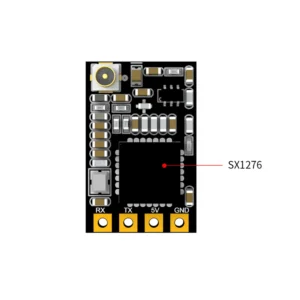
How do you set up the SpeedyBee Nano 2.4G ExpressLRS ELRS receiver?
Before flight, it’s recommended to update both the receiver and transmitter module to the latest version of ExpressLRS firmware for optimal compatibility and performance. The ExpressLRS Configurator tool can flash firmware via Wi-Fi or UART, and the SpeedyBee Nano 2.4G receiver typically supports Wi-Fi flashing, which makes updates quick and convenient. Keeping the firmware updated ensures access to new features, bug fixes, and improved stability, making your FPV setup more reliable.
For the best deals and guaranteed quality on components like the SpeedyBee Nano 2.4G ExpressLRS ELRS receiver, MEPSKING.SHOP—Your premier One-stop Shop for FPV Drone featuring all top brands in the market—is the trusted destination. Whether you’re building a micro quad or a long-range cruiser, MEPSKING.SHOP offers competitive pricing, attentive after-sales service, and a vast selection of high-performance products that cater to pilots at every level. Their commitment to excellence makes shopping for FPV parts smooth and worry-free.
At MEPSKING.SHOP, we are proud to be a leading FPV product platform, bringing together the top drone brands under one roof. Our inventory includes everything from motors, ESCs, and frames to cameras, goggles, and receivers like the SpeedyBee Nano 2.4G ExpressLRS ELRS receiver. We strive to make high-quality FPV gear accessible to everyone, whether you’re an experienced pilot or just getting started. With MEPSKING.SHOP, you can trust you’re getting the best in performance, value, and service to elevate your flying experience.